
Media Mastering requires Blubrry hosting and the Media Mastering add-on. It works whether you publish with Blubrry Publisher or PowerPress. In both cases the settings are configured in the Blubrry Podcaster Dashboard — they are not available in PowerPress.
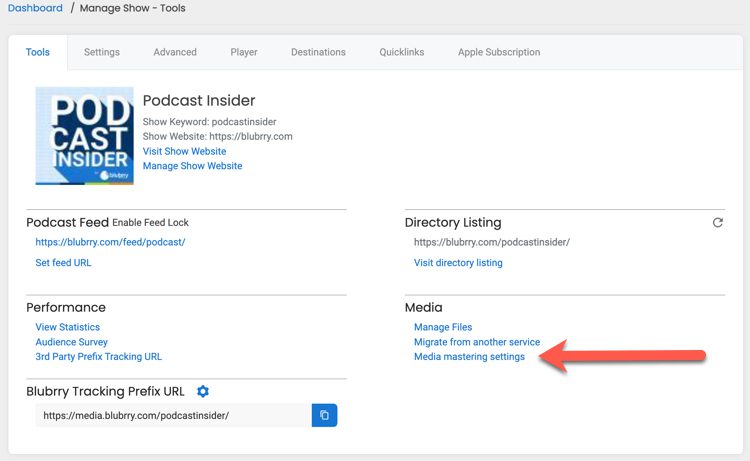
To open them, go to Manage Show - Tools and select Media mastering settings under Media.
Blubrry pre-selects optimal settings for media mastering, so you don't have to change anything to benefit from it. The settings below are available if you want to adjust how your audio is processed. Select Save Settings after making changes.
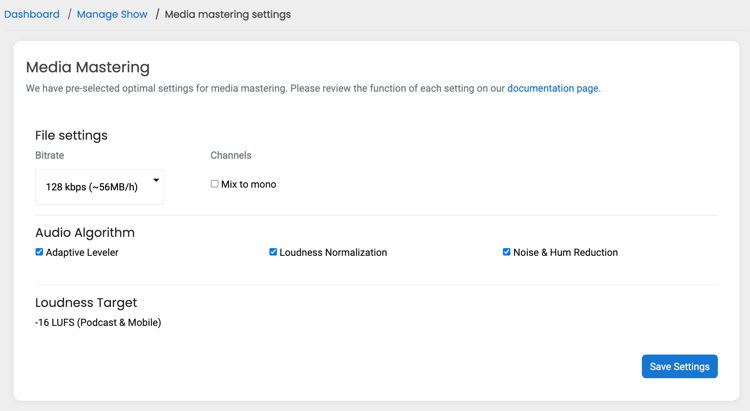
File settings
Bitrate
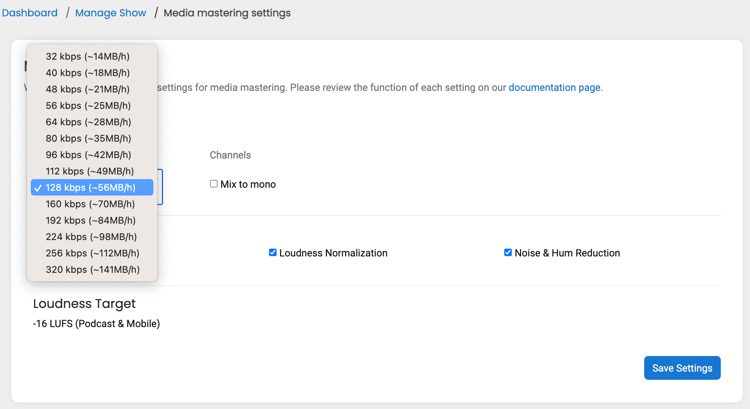
Sets the bitrate of the mastered file. Higher bitrates give better audio quality and larger files. Each option in the list shows the approximate file size per hour of audio, so you can see the trade-off as you choose.
- 128 kbps (~56MB/h) is the default and a good balance for most podcasts.
- If you upload a WAV file, choose the bitrate you want for the mastered file.
- If you upload an MP3, match the bitrate of your original file. Choosing a higher bitrate than the original won't recover quality that isn't in the source.
Channels
Select Mix to mono to combine your audio into a single channel. This suits spoken-word podcasts, where stereo separation adds nothing.
Leave it unchecked to keep your audio in stereo. Keep stereo if your show uses music or sound design where left-right separation matters.
Important: Mixing to mono does not reduce your file size — notice that the size estimates in the Bitrate list don't change when you select it. File size is determined by the bitrate. If you want smaller files and faster downloads for your audience, choose a lower bitrate.
Audio Algorithm
All three algorithms are enabled by default. You can turn any of them off if you'd rather Blubrry didn't apply that processing to your audio.
The following descriptions are re-purposed from Auphonic's documentation. Auphonic retains all rights to this text.
Adaptive Leveler corrects level differences between speakers, music and speech, and applies dynamic range compression to achieve a balanced overall loudness.
Loudness Normalization calculates the loudness of your audio and applies a constant gain to reach a defined target level in LUFS. The loudness is calculated according to the latest broadcast standards for radio and mobile (-16 LUFS).
Noise & Hum Reduction removes broadband background noise and hiss in audio files with slowly varying backgrounds. First, the audio file is analyzed and segmented into regions with different background noise characteristics, and a Noise Print is extracted in each region. Then a classifier decides how much noise reduction is necessary for each region.
Loudness Target
Fixed at -16 LUFS (Podcast & Mobile) and not editable. This follows current broadcast standards for podcast and mobile listening.
Blubrry Media Mastering is powered by Auphonic, a world leader in audio processing and a trusted platform used by Blubrry team members for many years.
Comments
0 comments
Article is closed for comments.